Over time, earwax, dust, and debris can build up in the speaker meshes on your AirPods Pro, affecting sound quality and the effectiveness of features like Active Noise Cancellation and Transparency mode.
Apple recommends cleaning the meshes using micellar water and a soft-bristled toothbrush, rather than sharp objects or compressed air, which can damage the delicate mesh.
What you’ll need
Before you begin, gather the following:
- Micellar water containing PEG-6 Caprylic/Capric Glycerides
- Distilled water
- A soft-bristled children’s toothbrush
- Two small cups
- A paper towel
You’ll also need to remove the silicone ear tips from your AirPods Pro before cleaning.
Cleaning the speaker meshes
Start by pouring a small amount of micellar water into one of the cups.
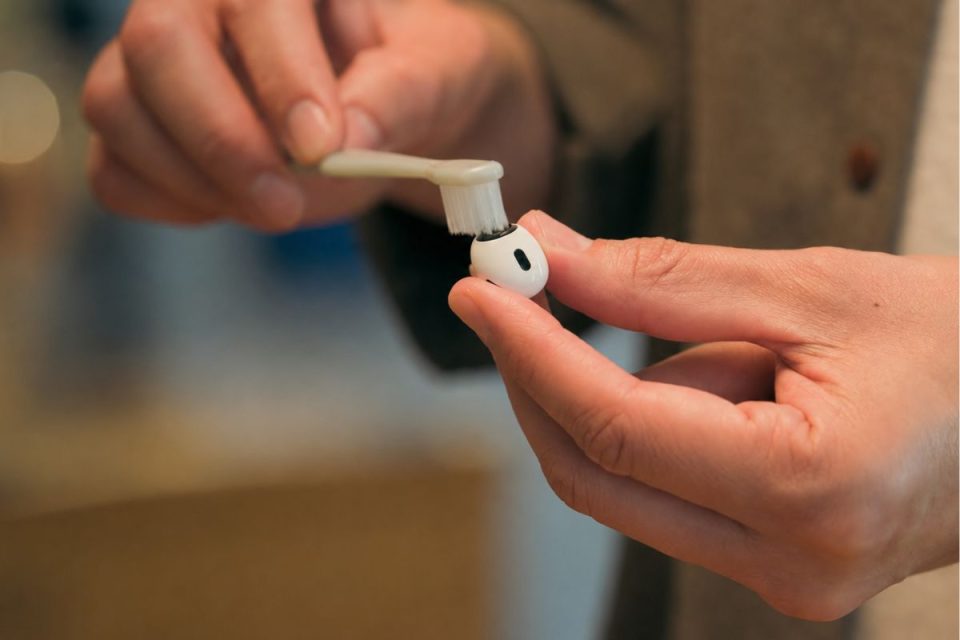
Dip the toothbrush into the micellar water until the bristles are fully saturated. Hold the AirPod with the mesh facing upwards and gently brush the mesh in small circular motions for around 15 seconds.
Once finished, turn the AirPod over and gently press the mesh against a paper towel to absorb any loosened debris and excess liquid.
Repeat this process three times for each mesh you want to clean.
After cleaning with micellar water, rinse the toothbrush using distilled water and repeat the same steps using only distilled water to remove any remaining residue.
Once complete, leave your AirPods Pro to air dry for at least two hours before using them again or placing them back into the charging case.
Cleaning the ear tips
The silicone ear tips can be removed and rinsed under running tap water.
Avoid using soap or household cleaning products. Once rinsed, dry the ear tips thoroughly with a soft, lint-free cloth and ensure they are completely dry before reattaching them to your AirPods Pro.
Cleaning the charging case
To clean the charging case, wipe the exterior using a soft, dry, lint-free cloth.
For stubborn marks, you can lightly dampen the cloth with isopropyl alcohol, taking care not to allow any liquid into the charging port or other openings.
If dust has accumulated inside the charging port, use a clean, dry, soft-bristled brush to remove it. Avoid inserting objects into the port, as this could damage the charging contacts.
What to avoid
When cleaning your AirPods Pro, never use sharp tools, abrasive materials, compressed air, or household cleaning products. Apple also advises against placing the earbuds directly under running water.
Taking a few minutes to clean the meshes every few months can help keep your AirPods Pro sounding their best and ensure features such as Active Noise Cancellation continue to perform as intended.