You can quickly share your contact details using NameDrop on Apple Watch, making it easy to swap information without typing anything.
NameDrop works between Apple Watch and iPhone, or between two Apple Watch models, as long as both devices are running the required software. You’ll need watchOS 10.1 or later, and the feature is supported on Apple Watch Series 7, Apple Watch SE (2nd generation), and Apple Watch Ultra models.
To share your contact from Apple Watch to iPhone, simply hold your Apple Watch display a few centimetres from the top of the other person’s iPhone. After a moment, both devices will light up and a connection will begin.

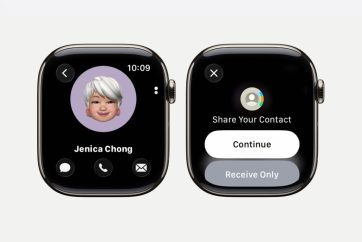
To share between two Apple Watch models, open the Contacts app on your watch, tap your profile picture in the top-right corner, then tap Share. Bring your watch close to the other person’s Apple Watch to start the process.
You’ll feel a subtle vibration and see a glow effect on both devices as NameDrop connects. Keep the devices close together until the sharing screen appears.
You can then choose whether to share your contact details and receive theirs, or just receive their information without sharing your own.
Once confirmed, the contact details will be saved automatically.
If you want to cancel the transfer, just move the devices apart before it completes.
NameDrop is designed for sharing new contact details only, so it won’t update an existing contact, but it’s one of the quickest ways to exchange information straight from your Apple Watch.